



Choosing the right Fibre Channel transceiver is important when upgrading or expanding a business storage network. Cisco offers different DS-SFP models for different speed and connectivity requirements.
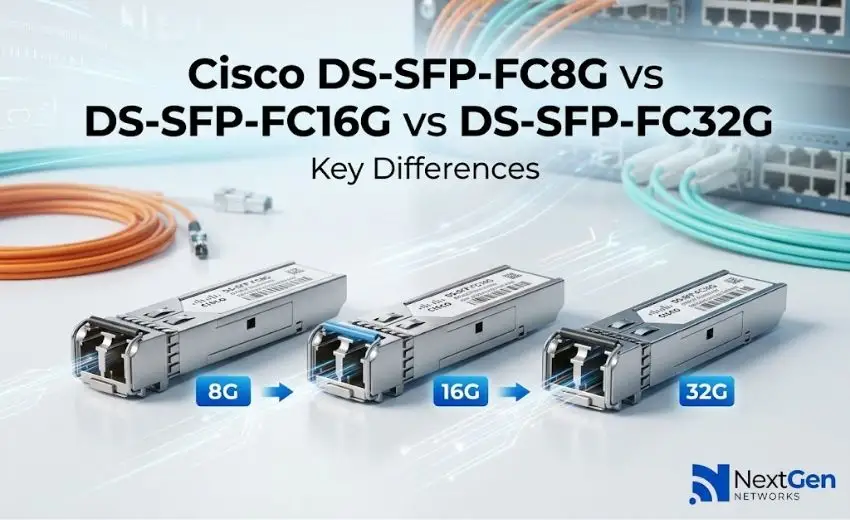
The Cisco DS-SFP-FC8G, DS-SFP-FC16G, and DS-SFP-FC32G are three options designed for Fibre Channel networks. If you are planning to buy Cisco optical transceivers, knowing the main differences between these models can help you make the right choice.
Cisco DS-SFP-FC8G
The DS-SFP-FC8G supports Fibre Channel speeds of up to 8 Gbps. It is a practical choice for businesses that already have an 8G Fibre Channel network and need replacement or additional modules.
It can be suitable for existing storage networks where upgrading to a higher speed is not currently required.
Best for:
- Existing 8G Fibre Channel networks
- Replacement requirements
- Storage connectivity
- Supported Cisco MDS platforms
Cisco DS-SFP-FC16G
The DS-SFP-FC16G supports speeds of up to 16 Gbps. It provides more bandwidth than an 8G module and can be considered by businesses looking to upgrade their Fibre Channel infrastructure.
It is suitable for data centers and storage environments that need improved network performance while continuing to use Fibre Channel technology.
Best for:
- 8G to 16G network upgrades
- Data center storage
- Higher-bandwidth requirements
- Supported Cisco MDS switches
Cisco DS-SFP-FC32G
The DS-SFP-FC32G supports up to 32 Gbps Fibre Channel and is designed for higher-performance storage environments.
Businesses with demanding storage workloads can consider this option when their Cisco MDS infrastructure supports 32G Fibre Channel.
Best for:
- High-performance storage networks
- Data center upgrades
- Heavy storage traffic
- Higher-speed Fibre Channel deployments
DS-SFP-FC8G vs FC16G vs FC32G
| Model | Speed | Common Use |
| DS-SFP-FC8G | Up to 8 Gbps | Existing FC networks |
| DS-SFP-FC16G | Up to 16 Gbps | Network upgrades |
| DS-SFP-FC32G | Up to 32 Gbps | High-performance networks |
The main difference is speed, but buyers should not select a module based on speed alone. Switch compatibility, fiber type, transmission distance, and network requirements should also be checked.
SW vs LW: What Should You Choose?
Cisco DS-SFP modules may be available in SW (shortwave) and LW (longwave) versions.
SW modules are generally used with multimode fiber for shorter links, while LW modules are designed for longer connections using single-mode fiber.
Before buying, check the fiber type and distance required for your network. This can help prevent compatibility issues and unnecessary replacement costs.
What Should You Check Before Buying?
If you are planning to purchase Cisco DS-SFP modules, consider these points:
- Switch compatibility: Make sure the module is supported by your Cisco MDS equipment.
- Speed: Choose 8G, 16G, or 32G according to your network requirements.
- Fiber type: Check whether you need multimode or single-mode fiber.
- Distance: Select the appropriate SW or LW version based on link distance.
- Future needs: Consider whether your network may require higher bandwidth later.
- Part number: Verify the complete product number before placing an order.
Buy Cisco DS-SFP Optical Transceivers from NextGen Networks
Finding the right transceiver is important for a reliable storage network. NextGen Networks helps businesses source networking and optical connectivity products for different infrastructure requirements.
Whether you need a DS-SFP-FC8G for an existing network, DS-SFP-FC16G for an upgrade, or DS-SFP-FC32G for higher performance, selecting the correct model and compatibility option is essential.
Conclusion
The Cisco DS-SFP-FC8G, DS-SFP-FC16G, and DS-SFP-FC32G are designed for different Fibre Channel speed requirements. The best option depends on your existing Cisco MDS equipment, required speed, fiber type, distance, and future network plans.
Before purchasing Cisco optical transceivers, always verify compatibility and specifications to ensure you get the right module for your business network.