



Choosing the right optical transceiver is important for any business network. A wrong module can lead to connection problems, delays, extra costs, or poor network performance.
Palo Alto Networks offers different transceivers for different speeds, fiber types, and network distances. Before buying a Palo Alto Optical Transceiver, IT teams should check a few important things.
Here are seven key points to check before placing an order.
1. Check Compatibility With Your Palo Alto Platform
The first and most important step is to check compatibility.
Not every transceiver works with every Palo Alto firewall or platform. Even if a module fits physically into an SFP or QSFP port, it does not always mean that it will work correctly.
Before ordering, check:
- Your exact Palo Alto PA-Series model
- Supported port type
- Supported network speed
- Compatible transceiver part number
- Firmware and platform requirements
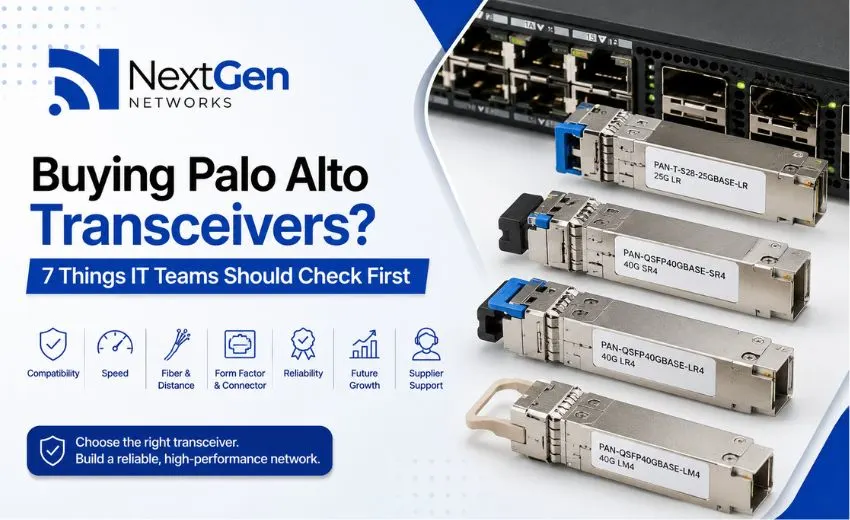
For example, if your network requires a 25G connection, you can consider the PAN-T-S28-25GBASE-LR. However, always confirm that your specific Palo Alto platform supports the required 25G interface before purchasing.
Checking compatibility before ordering can help avoid returns, installation delays, and network problems.
2. Choose the Right Network Speed
The next step is to decide what network speed you need.
Palo Alto transceivers are available for different network requirements, including 25G and 40G options.
For example:
- PAN-T-S28-25GBASE-LR – 25G long-range connectivity
- PAN-QSFP40GBASE-SR4 – 40G short-range connectivity
- PAN-T-Q40GBASE-SR4 – 40G SR4 option
- PAN-QSFP40GBASE-LR4 – 40G long-range connectivity
- PAN-T-Q40GBASE-LR4 – 40G LR4 option
When choosing the speed, don’t only think about your current network.
Ask yourself:
- Will network traffic increase in the next few years?
- Are you planning a data center upgrade?
- Will more users or devices be added?
- Do you expect higher bandwidth requirements?
Choosing the right speed can help your network handle future growth.
3. Check Fiber Type and Distance
Fiber type is another important factor when buying optical transceivers.
The two main fiber types are:
- Multimode fiber (MMF) – generally used for shorter connections
- Single-mode fiber (SMF) – generally used for longer connections
For example, the PAN-QSFP40GBASE-SR4 and PAN-T-Q40GBASE-SR4 are designed for 40G SR4 connectivity and are suitable for short-range applications.
For longer connections, the PAN-QSFP40GBASE-LR4 and PAN-T-Q40GBASE-LR4 are options to consider.
The PAN-QSFP40GBASE-LM4 can also be considered for suitable 40G network deployments.
Before ordering, check the actual distance between your network devices and make sure the transceiver matches your fiber infrastructure.
4. Check the Form Factor and Connector
Optical transceivers come in different sizes and form factors. Your transceiver must match the port on your Palo Alto equipment.
Common form factors include:
- SFP
- SFP+
- SFP28
- QSFP
- QSFP28
Connector type is also important.
For example, some 40G SR4 modules use MPO/MTP-style connections, while other optical modules may use LC connectors.
Before buying, check both:
Port type + Connector type
A mismatch can prevent the link from working even when the network speed is correct.
5. Consider Performance and Reliability
For business networks, reliability is very important.
A transceiver may have the correct speed and distance specification, but IT teams should also consider its quality and operating conditions.
Before purchasing, check:
- Optical performance
- Operating temperature
- Digital diagnostics or DOM/DDM support, where applicable
- Product quality
- Supplier testing
- Warranty and replacement support
For important business connections, a reliable transceiver can help reduce unexpected network issues and maintenance work.
6. Think About Future Network Growth
IT infrastructure changes over time.
A company may add more employees, applications, servers, cloud services, or data center equipment. This can increase network traffic.
That’s why it is useful to think about future requirements before buying transceivers.
Consider:
- Expected bandwidth growth
- Planned firewall upgrades
- Data center expansion
- Future fiber requirements
- Availability of replacement modules
For example, if your organization is moving toward higher-speed networking, make sure your fiber infrastructure and network equipment can support future upgrades.
The goal is not to buy more capacity than you need. Instead, choose equipment that fits your current needs while keeping future upgrades in mind.
7. Compare Supplier Support, Quality and Total Cost
Price is important, but it should not be the only factor.
A low-cost transceiver may become expensive if it causes compatibility problems, installation delays, or repeated link failures.
Before selecting a supplier, check:
- Product compatibility
- Product availability
- Warranty terms
- Replacement policy
- Technical support
- Compatibility testing
- TAA requirements, if applicable
- Lead time
For larger B2B network projects, supplier support can be especially important. IT teams and system integrators should have confidence that the selected module will work with their planned infrastructure.
Palo Alto Transceivers Available From NextGen Networks
NextGen Networks offers different Palo Alto Optical Transceivers for enterprise networking requirements.
Some of the available options include:
PAN-T-S28-25GBASE-LR
A 25G LR transceiver designed for long-range fiber connectivity.
PAN-QSFP40GBASE-SR4
A 40G SR4 option for suitable short-range network connections.
PAN-T-Q40GBASE-SR4
A 40G SR4 transceiver option for networks that require this configuration.
PAN-QSFP40GBASE-LR4
A 40G LR4 option designed for longer-distance fiber connectivity.
PAN-T-Q40GBASE-LR4
A 40G LR4 variant for applicable network and procurement requirements.
PAN-QSFP40GBASE-LM4
A 40G LM4 optical transceiver for compatible network deployments.
PAN-QSFP40GBASE-BIDI
A 40G BiDi option that can be useful in network environments where fiber usage needs to be reduced.
Before selecting a product, always confirm the exact Palo Alto platform, port, fiber type, distance, and connector requirements.
Palo Alto Transceiver Buying Checklist
Before placing your order, use this simple checklist:
- Confirm the exact Palo Alto PA-Series model
- Check supported transceiver part numbers
- Confirm the required network speed
- Check single-mode or multimode fiber
- Measure the link distance
- Confirm the connector type
- Check operating conditions
- Confirm compatibility
- Check warranty and supplier support
- Check TAA requirements if applicable
- Consider future network requirements
- Keep spare modules for critical links
Frequently Asked Questions
Can I use any SFP transceiver with a Palo Alto firewall?
No. Compatibility depends on the Palo Alto platform, port, transceiver type, and other requirements. Always confirm compatibility before ordering.
How do I choose the right Palo Alto transceiver?
Start by checking your firewall model, required speed, fiber type, transmission distance, port type, and connector. These factors will help you identify the right module.
What is the difference between SR4 and LR4?
SR4 is generally used for shorter-range 40G connections, while LR4 is designed for longer-range connectivity. Your fiber type and link distance should determine which option you need.
What is a BiDi transceiver?
A BiDi transceiver sends and receives data over a single fiber strand using different wavelengths. It can be useful where reducing fiber usage is important.
Why is compatibility important?
An incompatible transceiver may not establish a network link or may cause connection problems. Checking compatibility before purchase helps reduce installation issues.
Should businesses keep spare transceivers?
For critical network connections, keeping spare modules can help reduce downtime if a transceiver fails and a replacement is needed.
Conclusion
Choosing the right Palo Alto transceiver does not have to be complicated. Start with the basics: compatibility, speed, fiber type, distance, connector, reliability, and future requirements.
For B2B network projects, also consider supplier support, warranty, availability, and total cost instead of looking only at the initial price.
By checking these seven areas before ordering, IT teams can make better purchasing decisions and build a more reliable network infrastructure.
Explore the Palo Alto Optical Transceivers available from NextGen Networks and select the option that matches your network requirements.